WooCommerce plugin
Your customer traces the cutline. Not you.
If your shop already sells life-size cardboard cutouts, you know where the days go: open the photo, trace by hand, email a proof, wait, adjust, email again. Lifesizy Cutouts puts that whole loop on your own product page, and it finishes in seconds.
Your customer
Four steps, no email in between
- 1Uploads a photo on your product page: JPEG, PNG, WebP, or the HEIC an iPhone shoots by default.
- 2Watches the cutline appear on that photo, at the height they picked, in centimetres or inches.
- 3Drags points on the cutline if they want a corner cut differently.
- 4Ticks “I approve this cutline and my photo quality.” and orders.
You
An order that is ready to cut
- The order in WooCommerce as usual, with the photo, the height, the approved cutline and the chosen options on the line item.
- Written proof of what the customer approved and when, stamped on our side rather than the browser's.
- A Download production PDF button on the order screen: spot-colour cutline, your layer names, registration marks, fold line, PDF/X output intent.
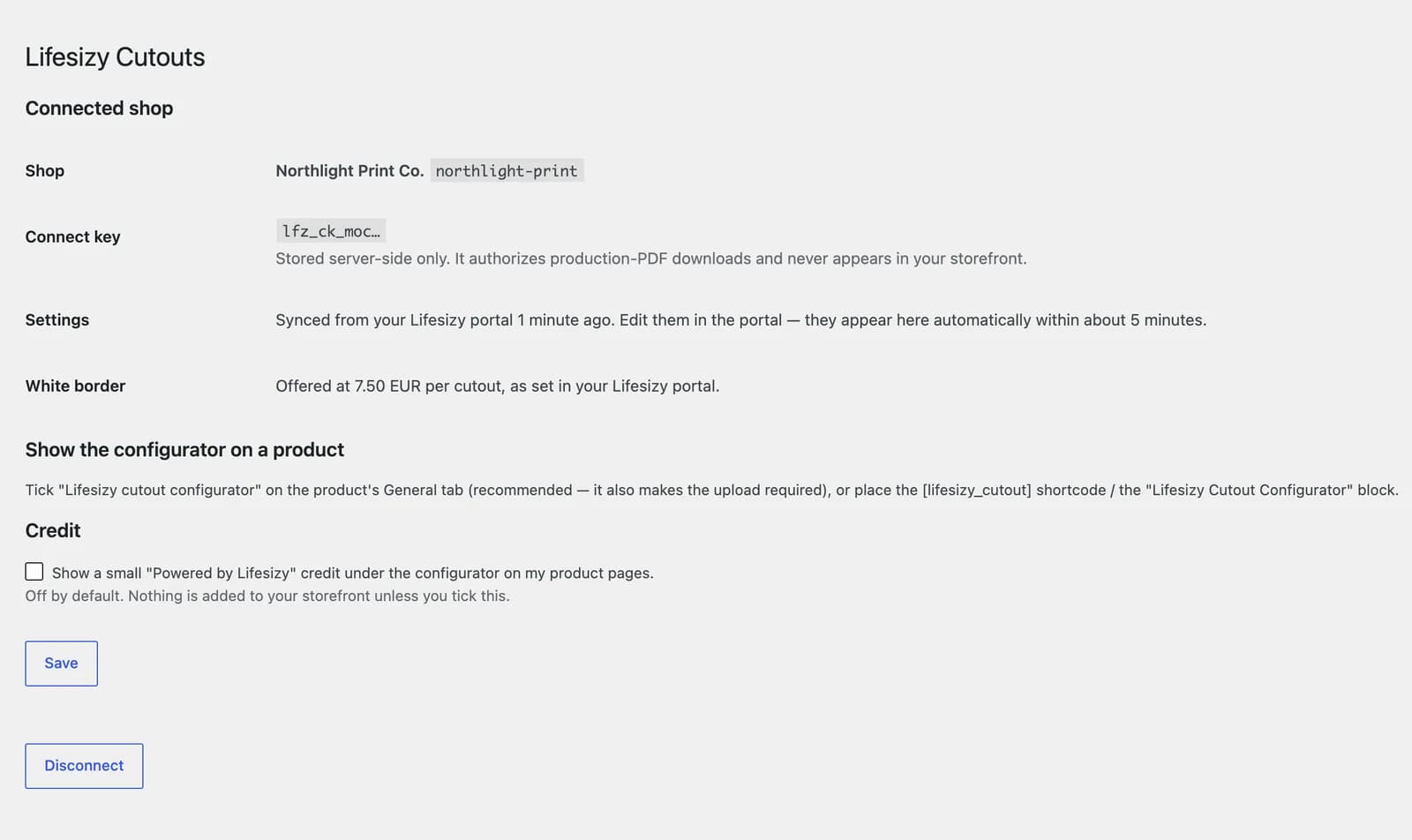
- Nothing added to your storefront. The “Powered by Lifesizy” credit is a checkbox that starts off.
Setup
One connect key. No settings screen in WordPress.
Colours, size range, cut margin, the white-border option and its price, cutline editing, the true-print-size magnifier: all of it lives in your Lifesizy dashboard, next to the PDF profile for your cutter. The plugin fetches it.
Why we built it this way
Two copies of a setting drift apart, and that drift shows up as a customer previewing a size you cannot actually cut. One copy, in the same place as your cutter profile, so they cannot disagree.
Change something, it follows
Edit a setting in your dashboard and your product pages pick it up within about five minutes. No plugin update, no cache to clear, no WordPress login.
If we have a bad day
The plugin keeps serving the settings it already has, so a hiccup on our side does not take your product pages down with it. The failure mode is a quieter page, never a broken one.
Tick the configurator on a product's General tab, or place it yourself with the [lifesizy_cutout] shortcode or the Lifesizy Cutout Configurator block.
Install
Three steps, about five minutes
No wizard, no API keys to generate, no settings to copy over. If your connect key is ready in the portal, this is the entire job.
- 1
Install and activate
Lifesizy Cutouts installs like any WooCommerce plugin: from the WordPress.org directory once the listing is live; until then we send it to you when your shop goes live. Activating changes nothing on your storefront yet.
- 2
Paste your connect key
Open WooCommerce → Lifesizy and paste the key waiting in your Lifesizy portal under Integrations → WooCommerce. The screen answers with the name of the shop it linked to, so you know it worked.
- 3
Switch it on per product
Edit a product and tick “Lifesizy cutout configurator” on the General tab. That product now shows the configurator and requires a configured photo before it can go in the cart. That is the whole install.
What the plugin sends us
Five requests. Nothing goes anywhere else.
The plugin talks to Lifesizy and to nobody else, and it says nothing at all until you connect it with a key from your own account. This is the same list as the plugin's readme, because a shop owner deserves to read it before installing.
Your shop settings
Your shop's public identifier.
Fetched in the background when a product page renders and the cached copy is over five minutes old. Your page never waits for it. No personal data involved.
Your connect key, once
The key you paste, on the moment you save it.
Comes back with your shop name so the plugin can confirm which account it linked to.
Your customer's photo
The uploaded photo, the chosen height and the options.
Sent from the customer's browser straight to our cutline engine, each time they ask to see a cutline. The engine stores nothing: the photo is processed and discarded. A photo may show a person, so reflect this in your own privacy policy.
The production PDF request
The stored photo for that order, the height, the approved cutline, the options and the order number.
Only when you click Download production PDF, and always from your server, never from a browser.
The paid-order sync
For each paid cutout order: the stored photo, the height, the options, the approved cutline, the approval statement and time, and the order number.
Shortly after an order is paid, from your server in the background, so it never delays checkout. This puts the order in your Lifesizy dashboard too, so you work from one list. The photo is kept for fulfilment and deleted under the retention terms of your data processing agreement.
Where photos live on your own site. Uploads are re-encoded on arrival, which strips EXIF including GPS, and written with unguessable filenames that are not the identifier the browser holds. They are served only through a permission-checked handler, never as a public URL. A photo that never became an order is deleted after two weeks; a photo on an order goes when the order goes, and an erasure request removes it through WooCommerce's own personal-data eraser. Since plugin 0.4.0 that eraser also asks us to delete our copy in the same run, so one tool completes the request. The configurator sets no cookies and runs no analytics.
Read the privacy policy and the service terms.
Requirements
What it needs to run
- WordPress
- 6.5 or newer
- WooCommerce
- Active, HPOS or classic order tables
- PHP
- 8.1 or newer
- Lifesizy account
- Required: the plugin is a client for the service
Getting it
How you install it today
We are publishing Lifesizy Cutouts in the WordPress.org plugin directory. Until it is listed there, you get the plugin from us directly when your shop goes live, along with your connect key. Same plugin, same code.
The plugin is free and included on every plan. Setup is three steps: install, paste the key, tick a product.
Get your shop set upWordPress is a registered trademark of the WordPress Foundation. WooCommerce and Woo are trademarks of Automattic Inc. Lifesizy is an independent product and is not affiliated with, endorsed, or sponsored by either.
Put an AI cutline preview on your product page
Your customers upload a photo and see their cutout at true size in seconds, with the production cutline already drawn. Book a demo and we'll show it running on your own products.
One email. We'll show it running on your own products, no obligation. We reply within one business day.